Skip to content
Go to Index

返回首页

Pano2VR 7.1 文档 / 添加补丁


添加图像补丁


补丁工具最常见的用途是修饰最低点(向下镜头)。仅提取最低点的一部分,在图像编辑器中修饰提取的图像,然后更新补丁。


修补最低点


  1. 从查看器模式中选择补丁模式 (将鼠标悬停在查看器左上角的图标上)。


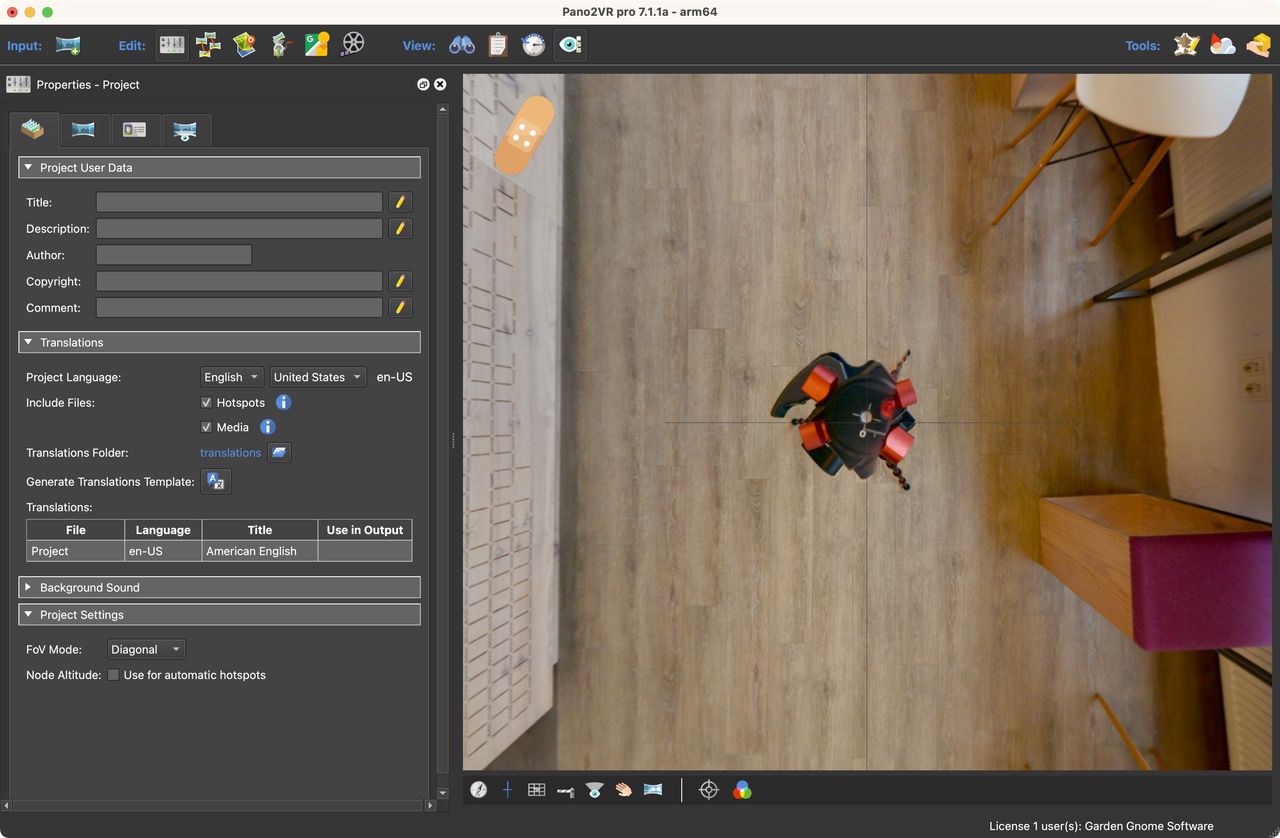
  2. 在查看器中,将全景旋转到要修补的位置。在本例中,向下拍摄以隐藏三脚架。

    Patch location

    补丁位置


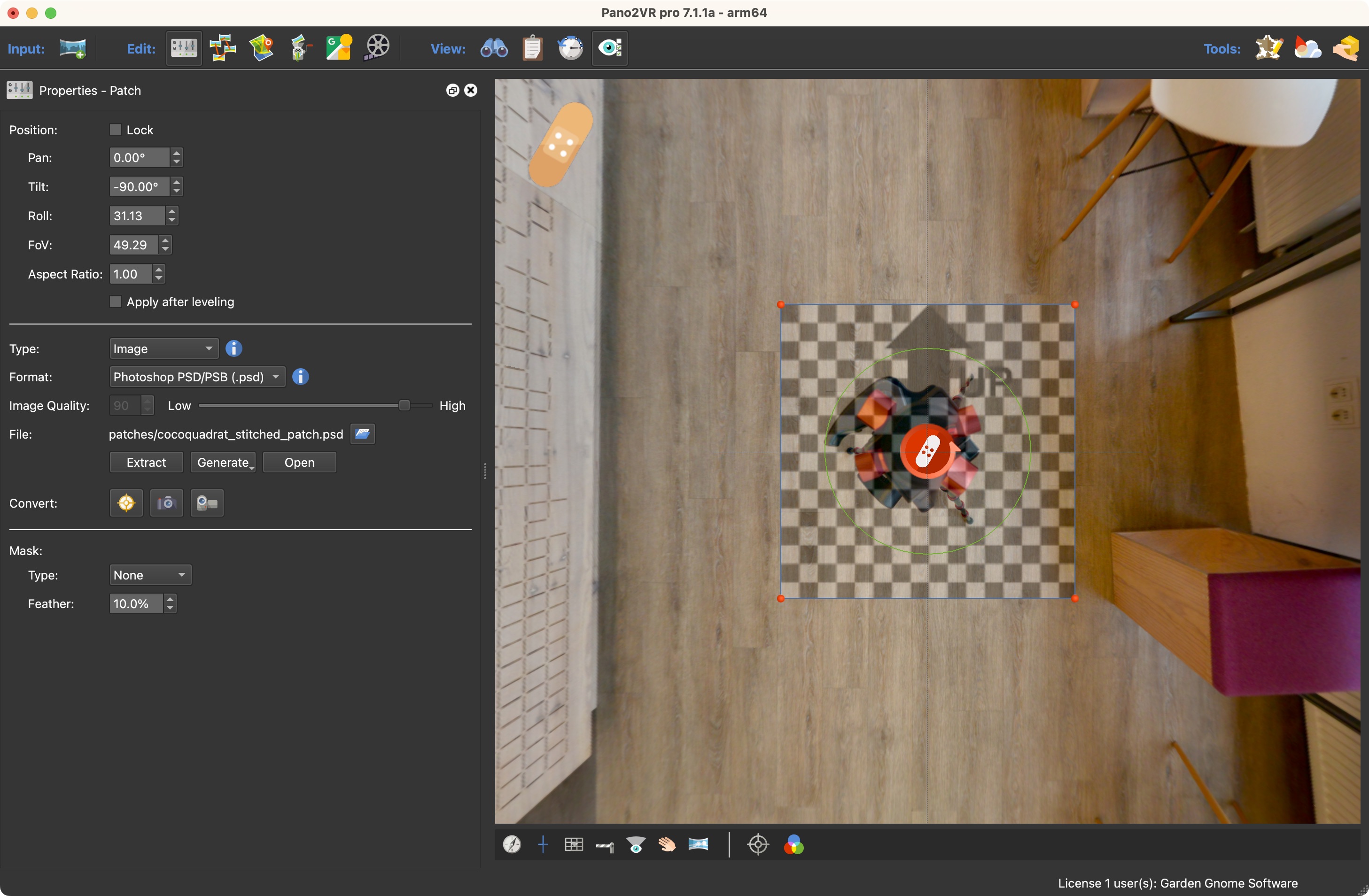
  3. 在查看器中双击以添加补丁。补丁将由棋盘表示。您可以通过拖动中心来移动补丁。也可以通过拖动红色手柄来调整补丁的大小。补丁将捕捉到天顶和最低点。
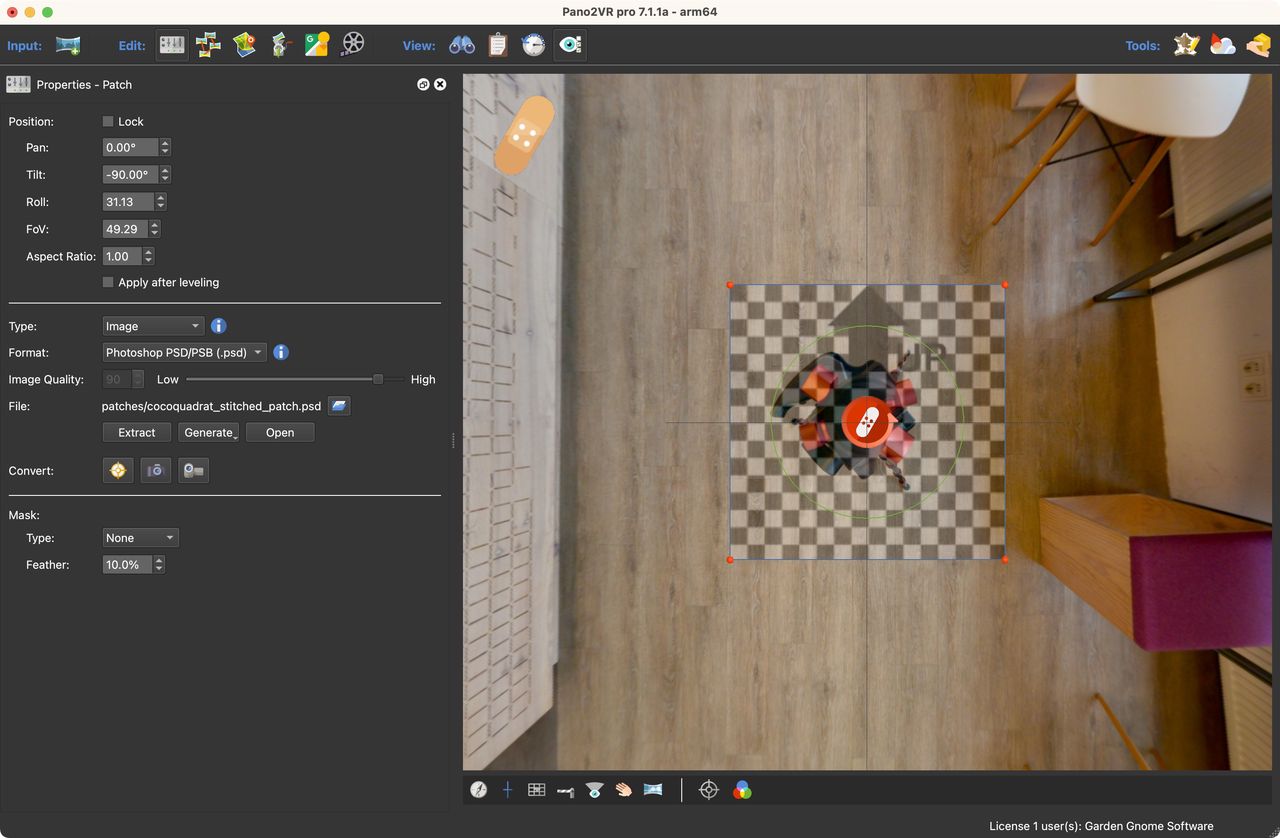
    Added patch

    添加了补丁


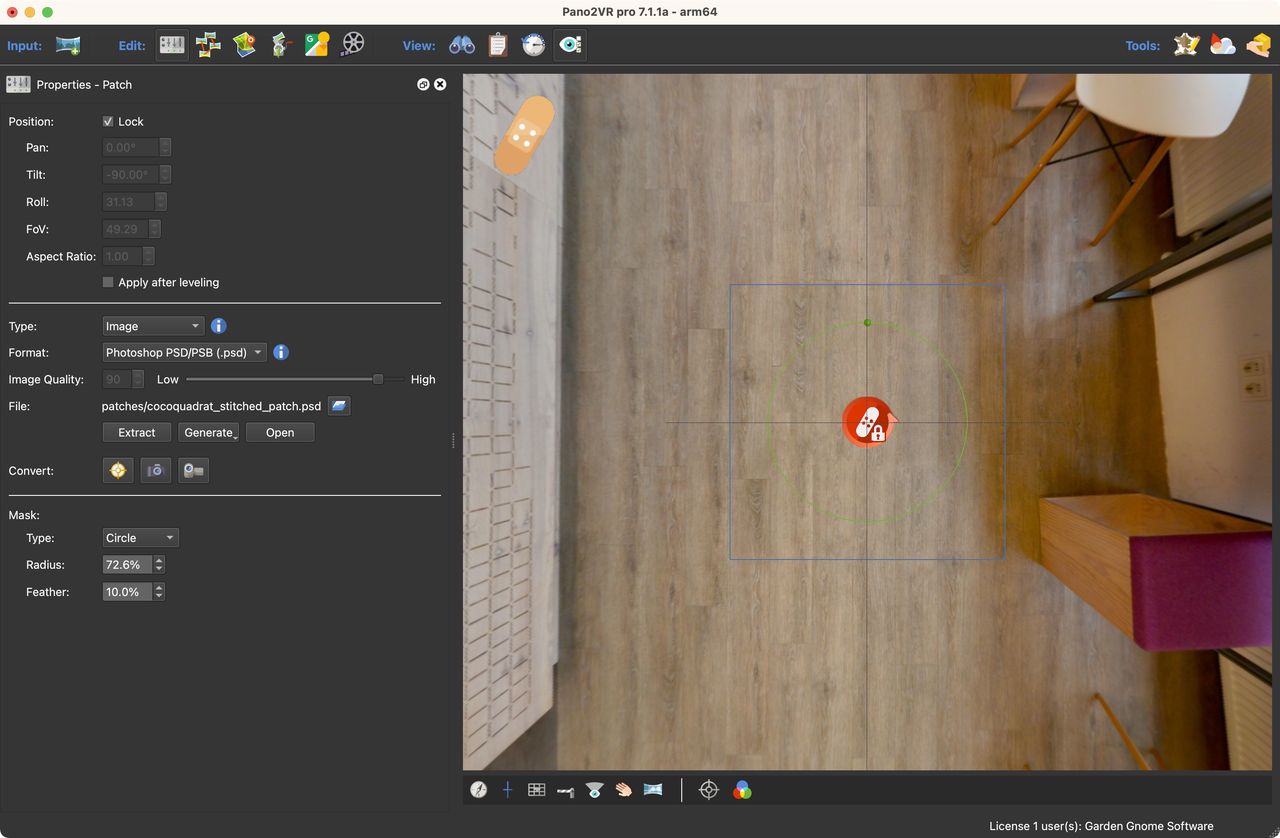
    “ 属性”面板将打开并显示 Patch 的属性。


  4. 对于 “类型 ”,选择 “图像”。( 图像是默认选择。


  5. 将格式保留为 Photoshop 文件。


  6. 单击“提取 ”。如果安装了 Photoshop(或任何接受 Photoshop 文件的照片编辑器),则在点击 “提取” 后,补丁将在 Photoshop 中打开。


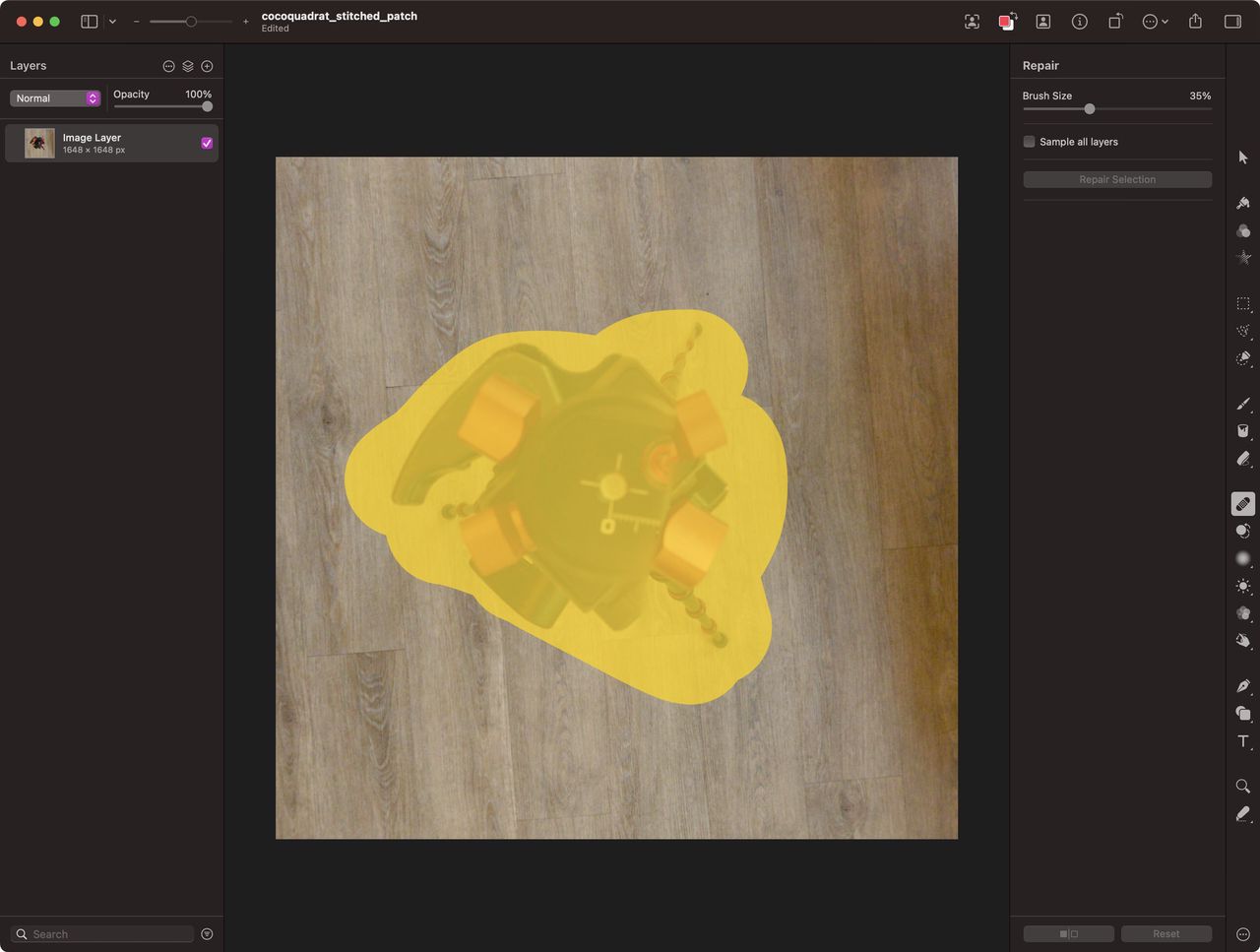
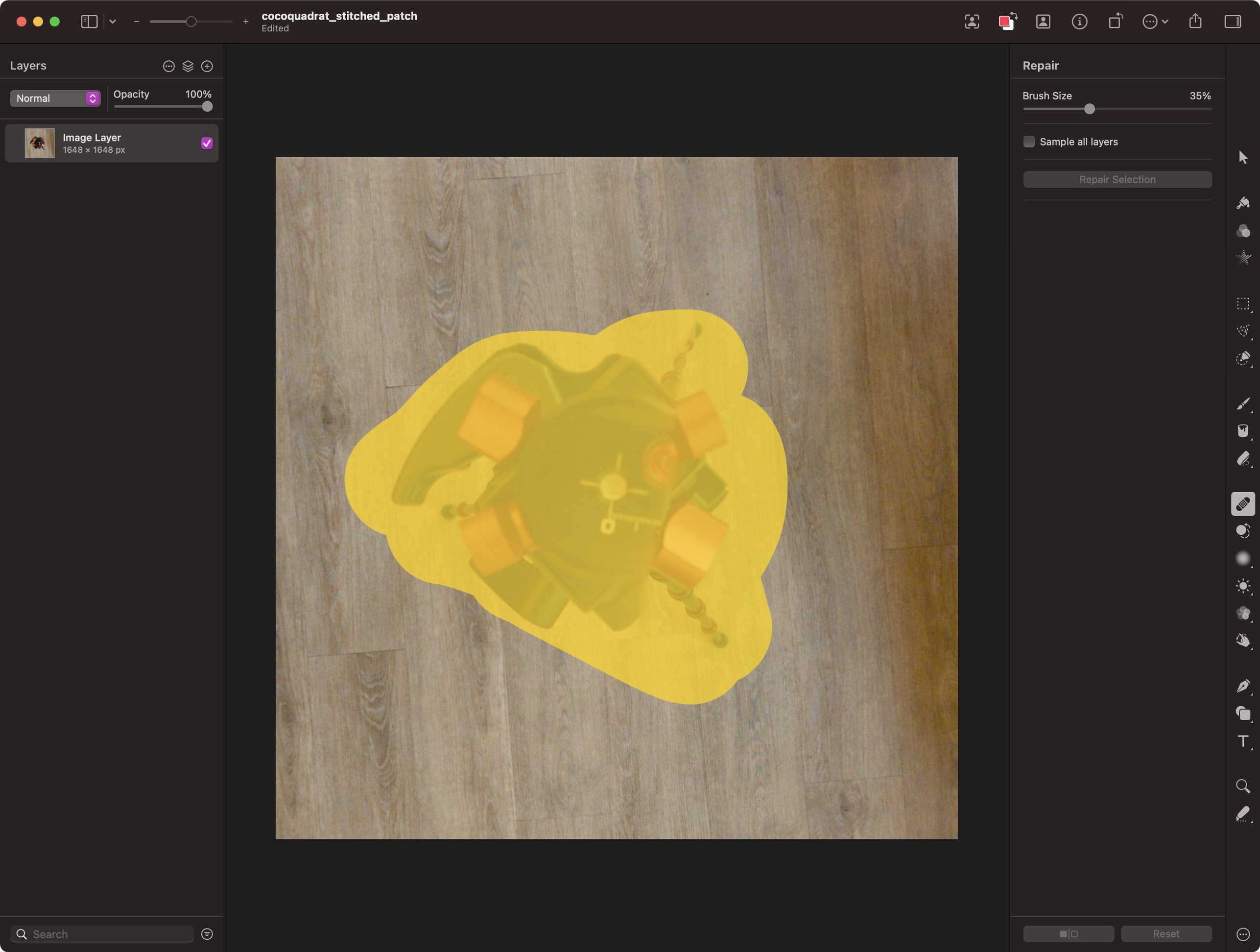
  7. 在照片编辑器中编辑提取的补丁,然后保存它,覆盖原始的提取补丁。

    Editing the image patch in Pixelmator Pro.

    在 Pixelmator Pro 中编辑图像补丁。


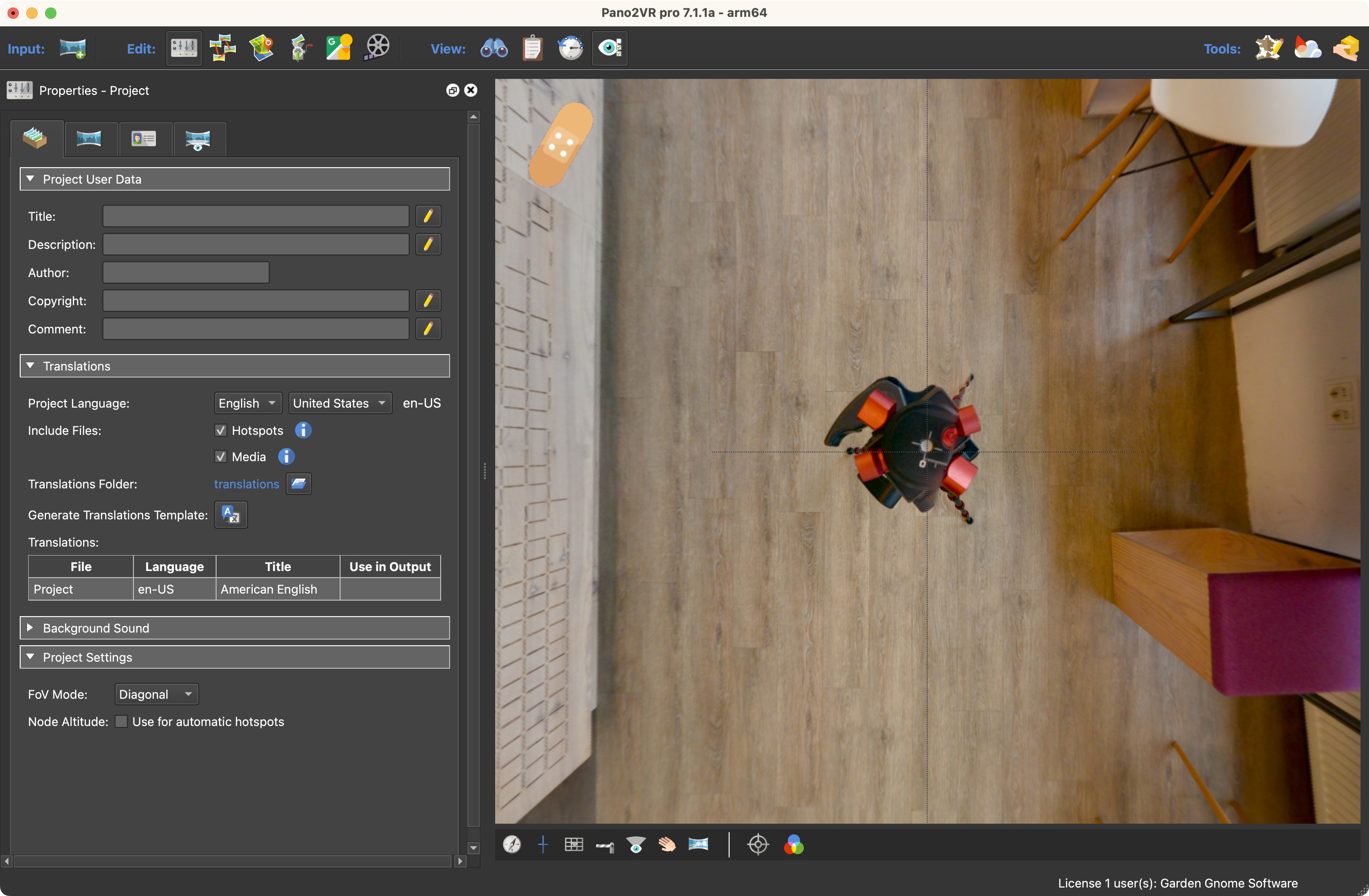
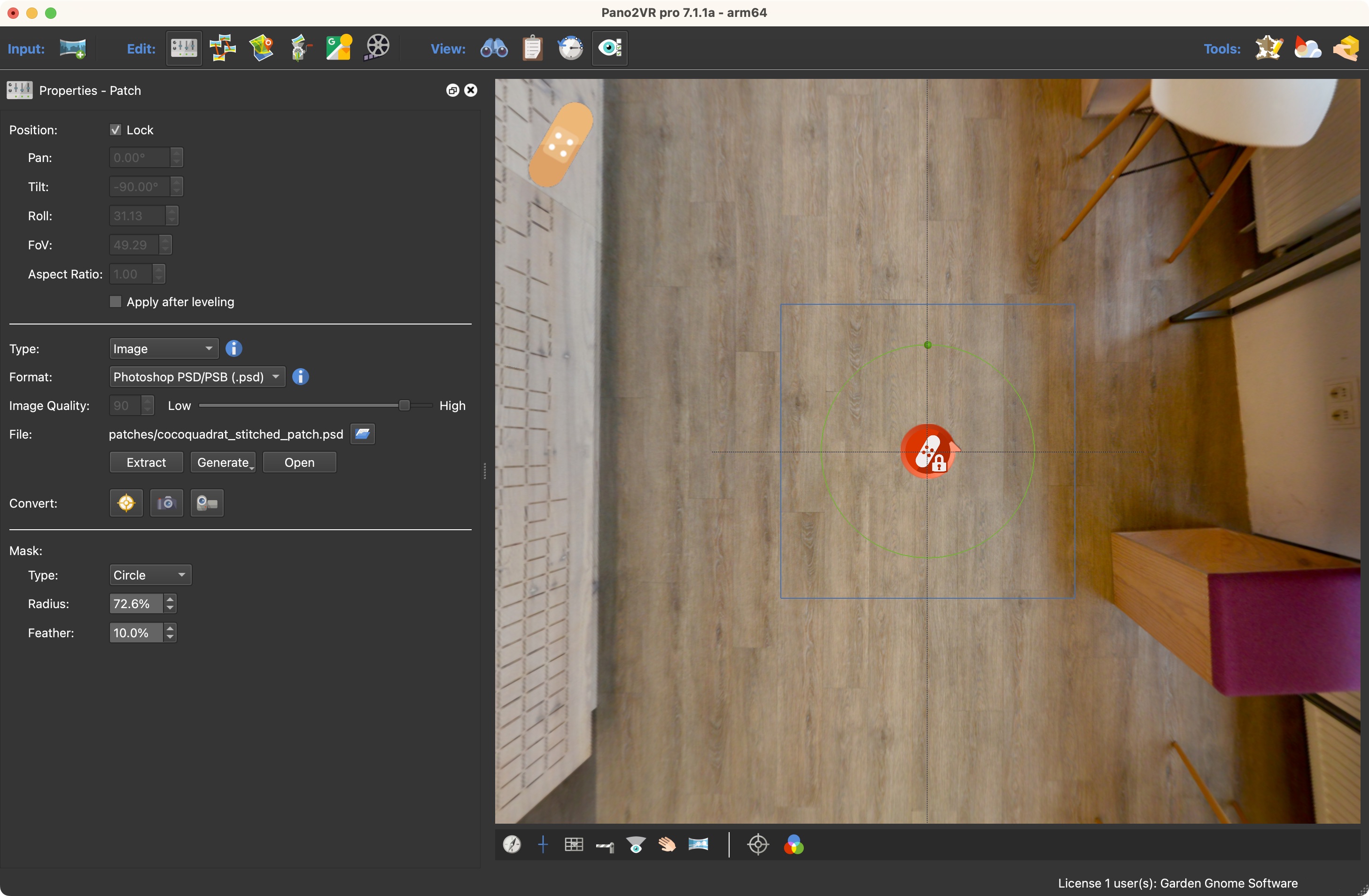
  8. 返回 Pano2VR。全景图将使用编辑后的补丁自动更新。

    Updated patch

    更新补丁


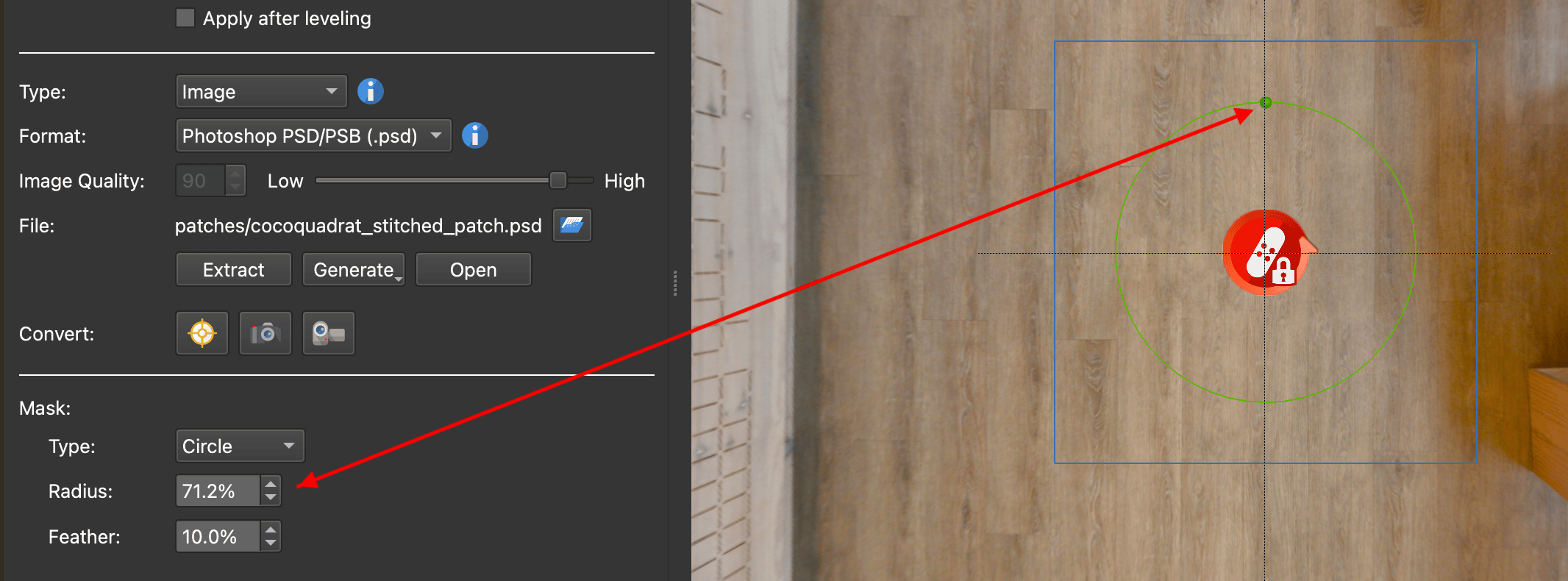
  9. 如果需要,请调整羽化蒙版 。例如,为此,选择 “圆形” 作为类型。拖动色片内的绿色手柄以调整 “半径”。如果需要,通过拨入百分比来更改羽化量。色片将更新。如果它没有立即更新,请稍微摆动鼠标。
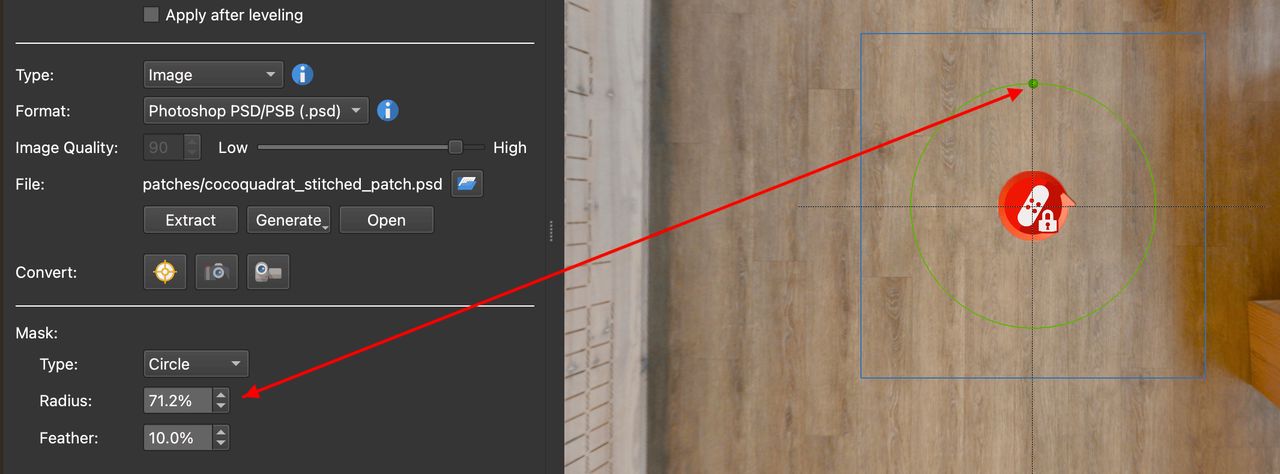
    Adjust the Mask.

    调整蒙版。


★ 提示  Patch 文件位于项目文件夹的子文件夹中。


复制补丁


复制补丁的方法有多种。复制并粘贴到查看器中以进行精确放置或使用列表视图 。


使用查看器


  1. 激活要复制的补丁(红色)。

  2. 右键单击查看器中的任意位置,然后选择复制活动补丁 。

  3. 要粘贴,请右键单击查看器中的任意位置,然后选择 “粘贴媒体元素” 进行粘贴。


使用列表视图


  1. 打开列表视图 。

  2. 右键单击补丁并选择复制或使用 Control-C (win)/Command-C (macOS)。

  3. 右键单击补丁并选择复制或使用 Control-V (win)/Command-V (macOS)。


另请参阅...


  • 补丁模式


  • 添加镜像球


  • 列表视图面板


  • 将 Patch 转换为点热点 (用于创建翻转效果)


  • 模糊补丁


索引


单击文件夹图标以展开


  • 什么是新的?

  • 用户指南

    • 开始
      • Installation
      • Project Setup
        • Organizing
          • Using Tags
          • Filtering
          • Find Missing Files
        • Prepare the Images
          • Default View
          • Leveling
          • Add User Data
          • Setting Location
          • Converting Images
      • Drag and Drop

    • 建筑参观
      • Building Tours
      • Maps and Floor Plans
        • Add a Tour Map
        • Add a Floor Plan
        • Using Custom Map Tiles
        • Setting up Google Maps API key
      • Create a Tour for WebXR
      • Tours for Google Street View
        • Basic Workflow
        • Adding Levels
      • Adding Transitions
      • Edit Master Node
      • Theta Tour

    • 修补

      • 添加补丁

      • 镜球最低点

      • 添加徽标

      • 生成式 AI 图像补丁

      • 模糊补丁

      • 修补自己

    • 使用热点
      • Add a Point Hotspot
      • Add a Polygon Hotspot
      • Create Tooltips
      • Linking to Nodes
      • Animated Hotspots
      • Connecting to the Skin
      • Tracking Hotspots
      • Create a Custom Hotspot Image

    • 创建弹出窗口
      • Built-in Popups
      • Polygon Hotspot Popups
      • Create a Website Popup

    • 使用媒体
      • A Note on Sound
      • Background Sounds
      • Pinned Images
        • Pinning Images
      • Pinned Sounds
        • Adding Sounds
      • Pinned Videos
        • Pinning Videos
      • Lens Flares
      • Pinned Web Elements
        • Pinning Web Elements
      • Embedded Video
      • Alternative Files
        • Convert Audio File
        • Convert Video File

    • 多语言项目
      • Translating Skins

    • 动画
      • Clips, Sequences, Keyframes
      • Editing Keyframes
      • Animating a Single Panorama
      • Animating a Tour
      • Connecting to a Skin
      • Adding a Subtitle Track

    • 创建皮肤
      • Using the Color Tool
      • Using Components
      • Create Responsive Elements
      • Auto Tags as Triggers
      • Auto-hide Skin Elements
      • Creating Map Markers
      • Video Element Tips
      • Using Action Filters
      • Using Variables
      • Search in the Skin Editor
      • Skins for Configurations
      • Mapping Keys to the Skin
      • Using Regular Expressions
      • Components Tutorials
      • Styling with CSS
        • Adding Google Fonts
        • Embedding Fonts
        • Create Animated Hotspot Icons
        • Create Buttons Using Text Boxes
        • PopUp Image with Scrolling Text

    • 视频全景
      • Working with 360º Video
      • 360º Video Tour
      • Working with VR180 Video
      • Working with 360º Video Resolutions

    • 输出
      • Web Output
        • Garden Gnome Package
          • Using the Package Plugins
          • WordPress Plugin
          • Desktop Viewer
          • Joomla Plugin
          • Package Viewer for iOS and Android
          • Drupal Plugin
        • Upload to Gnome Cloud
      • Animation Output
      • Transformation Output
        • Create a Little Planet
        • Create a Thumbnail
      • Exporting for VR
      • Integrated Web Server
        • Using the Web Server
      • Posting in Social Networks
      • Create a Droplet

    • 实用技巧
      • Add Logo to Context Menu
      • Adding Custom Text Fields
      • Direct Node Access
      • Creating a Desktop Application
      • Working with Large Projects
      • Panotour Pro Projects

    • 特殊效果
      • Rollover Effect
      • Before and After Tours

  • 工作区
    • Menu Bar
    • Toolbar
    • Properties
      • Project Properties
      • Panorama Properties
      • User Data
      • Viewing Parameters
    • Viewer
    • Viewer Modes
      • Image Properties
      • Lens Flare Properties
      • Sound Properties
      • Video Properties
      • Point Hotspot Properties
      • Web Element Properties
      • Polygon Hotspot Properties
    • Animation Properties
    • Tour Browser
    • Patch Properties
    • Tour Map
      • Maps Properties
      • Floor Plan Properties
    • Output
      • Animation Output Properties
      • Web Output Properties
      • HTML Templates Overview
        • normal.ggt
        • ggpkg.ggt
      • Transformation Output Properties
    • Google Street View
    • Animation Editor
    • History
    • Overview
    • List View
    • Viewer Settings
    • Skin Editor
      • Tree
      • Canvas
      • Properties
      • Toolbar
      • Menu Bar
      • The Color Tool
      • Components Toolbox
      • Skin Elements
        • Container
        • Rectangle
        • Text
        • Image
        • Button
        • SVG Image
        • Lottie
        • PDF
        • External Image
        • Node Image
        • Scroll Area
        • Cloner
        • Timer
        • Hotspot Template
        • Map
        • Video
        • Seekbar
        • Code Element
      • Actions and Modifiers
        • Sources
        • Actions
        • Modifiers
        • Examples
      • Logic Blocks and Action Filters
        • Triggers
    • Gnome Cloud Browser
    • Layout Customization
    • Settings

  • 参考
    • Tutorials
    • Placeholders
    • Keyboard Shortcuts
    • Input Formats
    • Javascript API
    • HTML Template
    • Command Line
    • Creating a Support Package

  • 词汇表
    • action
    • asset
    • auto tags
    • container
    • cross
    • default view
    • droplet
    • custom property
    • element
    • ffmpeg
    • field of view
    • flat image
    • ghost hotspot
    • hotspot proxy ID
    • hotspot
    • hotspot template
    • keyframe
    • loading bar
    • master node
    • node marker
    • node
    • pan
    • patch
    • placeholders
    • pointing
    • remap
    • skin
    • strip
    • SVG
    • component
    • tag
    • tee
    • toggle
    • vr180
    • z-index

  • 目录

  • 标签


本页内容


  • 修补最低点

  • 复制补丁

    • 使用查看器

    • 使用列表视图

  • 另请参阅...


标签


  • # 标志

  • # 最低点

  • # 补丁


最后修改时间: 2024 年 7 月 17 日